Maintenance Connection Everywhere (MCe) · EAM/CMMS manuals
This bug is not copied when converting to MCe Automations. MCe Automations in this case take the current meter at the time of processing and increment it from that value.
TL;DR:
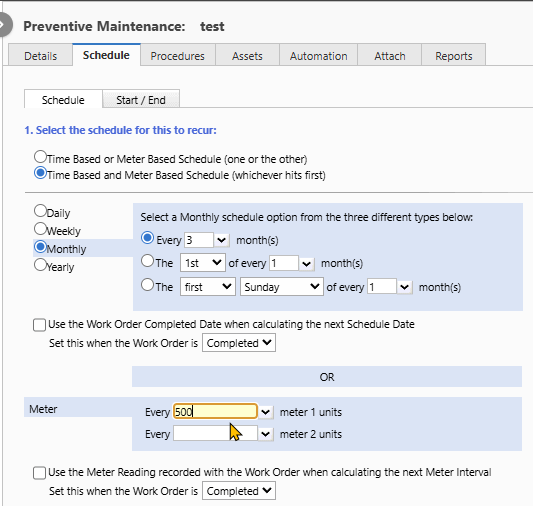
NEVER do a 'Time Based and Meter Based Schedule' with out selecting the checkbox labeled "Use the Meter Reading recorded with the Work Order when calculating the next Meter interval"
Warning: It is NOT checked by default. Make sure you check it.
Equipment will fail in a damaging way if you don't because the meter/usage won't trigger the change.
Always set it this way:

Details:
These will never work the way you expect unless you select the "Use the Meter Reading recorded with the Work Order when calculating the next Meter interval". If you do set that, then no problem. But if you don't - it doesn't matter what other settings you set, as soon as the Schedule one happens once, the Meter one will never work properly again.
Consider this scenario: You've done several PMs caused by the meter going up 500. The Meter is set to 8500.
Now, you only use let's say 270, so the meter, if you were to read it, would read 8250, 8000 - the value that the 8500 above was calculated from.
But it has been 3 months since the last PM. So the 3 months is the trigger (since 8250 isn't 8500).
The meter is then set to 8500 + 500, or 9000.
This means there is a 750 interval, not 500, before the next meter trigger. So you can use 750 or 3 months whichever comes first.
There are no scheduled maintenance that we have ever come across that this makes sense. And this problem can get bigger and bigger over time if the usage isn't enough to trigger. All is fine until one quarter where you are using it harder, and you expect the meter to trigger maintenance when you hit 500, but it doesn't because the next meter trigger is significant more than 500 from the last maintenance.