

 Maintenance Connection Everywhere (MCe) · EAM/CMMS manuals
TL;DR
Parameters make a single report reusable by allowing it to return different results without changing the SQL query.
- Static Parameters
- can be explicitly referenced in the query (e.g.
AccountID = @AccountID). Use them when the report should always filter on known fields. - can be used in script code, they don't have to be used in SQL
- can be used in both script(s) and SQL in the same report if there is a reason to do that.
- can use a custom list of predefined values.
- can use fields from a database table or a lookup as a predefined list of values for the user to select from.
- can be explicitly referenced in the query (e.g.
- Dynamic Parameters
- generate SQL conditions only when values are provided.
- are inserted into the query using either
/**where**/or/**filter**/, allowing optional filtering without writing every possible combination. - cannot be used in scripts.?This is not strictly a truthful statement. Scripts can do just about everything. How it is difficult to use them in scripts and more important: if you use our Professional Services to help you use them, at some future upgrade they will break and you'll have to use our Professional Services again to rewrite that code. So for most purposes it is better to think of them as if they cannot be used in scripts.
- Static and Dynamic Parameters
- can be used together in the same where clause. Place any constant conditions or static parameters first, and put
/**filter**/at the end of theWHEREclause so dynamic filters can be appended correctly. - can bepreconfigured and locked at different levels (such as report placement or user/asset group) to simplify report execution and enforce security.
- can be used together in the same where clause. Place any constant conditions or static parameters first, and put
Parameters
Parameters allow a single report to produce different results without modifying the query itself. Instead of creating multiple versions of the same report, you can supply different values
- at runtime
- when placing a report where it can be run, this can be at two levels to filter or customize the data that is returned:
- one for the asset group/user,
- one just based on placed in the location
For example, a single report can display data for:
- All Repair Centers
- A specific Repair Center, perhaps the one of the user running it
- A single Account
- Any combination of filters
How to choose between them:
| Static Parameters | Dynamic Parameters | |
|---|---|---|
| # of values | 0 or 1 values | 0, 1 or more. Arrays 0-n, Between has 2, others vary |
| # of values if required or default | Exactly 1 value | 1 or more values |
| In SQL Query | If so they are statically defined, they have a specific place in the SQL. | Dynamically generate SQL filter conditions at runtime. |
| Can be referenced in a script? | Yes, params.<paramName> | No?Technically there is a way with each version that you can access the values but it is not guaranteed to be the same in future or previous versions. Contact Professional Services if you want to with that with this caveat/understanding. |
| If no value is permitted | If the field can have the value null (not required and no default) and used in SQL, you must write the SQL to handle this case. | The SQL is generated at run time, it dynamically changes to handle nulls (no value) |
| Best for SQL when: | Every execution uses the same filters, though the values in the filter still can change. | Best when filters are optional or vary between executions. |
| Syntax: | Uses standard SQL parameter syntax. For example: WHERE Account ID = @AccountID | Uses reserved placeholders /**where**/ or /**filter**/ |
Params can be hidden, locked, so they can't be changed at the next level
At each level you can lock parameters so people running the report can not change one or more parameters
- for ease of use
- for security reasons
Resulting flexibility
This flexibility makes reports reusable, easier to maintain, and more user-friendly.
The parameters and ability to specify them at different levels means you don't need nearly as many reports, rather one can do multiple purposes and as mentioned above, easier to maintain because you change 1 not many.
Static Parameters
A static parameter is a predefined input whose name and data type are determined when the report is designed. While the value changes each time the report runs, the parameter itself always exists and is referenced directly within the query.
The static parameter has the following features:
1. Can be used to filter the reports through queries
Static parameters are ideal when you always know which fields the report will filter on.
Example:
Suppose the report contains two parameters:
- AccountID
- RepairCenterID
The query can reference these parameters directly, see lines 10 and 11 in the code below:
SELECT
  AccountPK,
  AccountID,
  AccountName,
  RepairCenterPK,
  RepairCenterID,
  RepairCenterName
FROM Account
WHERE Type = 'DEPT'
AND AccountID = @AccountID
AND RepairCenterID = @RepairCenterID
When the report runs, the values entered by the user are substituted into the corresponding parameters.
Notice the key word AND is placed before the 1st and between multiple dynamic params. This means if your WHERE clause constant and static param portions are joined with anything other than ANDs you should put ()s around your constant/static clauses. You can do this all the time. So for example you might say WHERE (Type = 'DEPT' or Type = 'GL' ) because without the brackets it won't logic out the way you intended. If you want to always use the ()s, that is fine too. It is perfectly ok to say WHERE (Type='DEPT') for example.
If you get into complex combinations, our Professional Services can help you, but in this day and age - consider using LLM AI to describe what you want, it will often get it correct.
2. Can be used to enter/store values that can be accessed through scripting
A static parameter can be used like a variable where you can enter or store a value that can be accessed and used within scripting.
Example:
Suppose you have an integer parameter called amountDeducted, and you want to subtract this value from the report's Total field.
You can access the static parameter in script using:
params.amountDeductedYou can access the Total field from the current report row using:
row.TotalYou can then subtract the parameter value from the Total field:
row.Total - params.amountDeductedFor example, if row.Total is 100 and params.amountDeducted is 25, the result would be 75.
Here is what this would look like in the Script Editor:
var deductions = row.Total - params.amountDeducted ;
return deductions
3. Can use a custom list
A static parameter can use a custom list as its available values to make it easier to pick and to restrict entries to a known set of values.
Example:
To create a custom list, configure the static parameter as a Data Set Picker and connect it to a data set.
Step 1: Create the Data Set
Create a new Database SQL Query data set and name it FruitList.
In the Query tab, create a query that returns the list of fruits. The query should provide two columns:
- Text — The value displayed to the user.
- Value — The value that is actually passed to the parameter.
For example:
| Text | Value |
|---|---|
| Apple | 1 |
| Banana | 2 |
| Orange | 3 |
SELECT Value, "Text"
FROM (
    VALUES
        (0, 'Apple'),
        (1, 'Orange'),
        (2, 'Grape'),
        (3, 'Mango')
) AS Source (Value, "Text")
Step 2: Configure the Parameter
Create a new static parameter with the following settings:
| Setting | Value |
|---|---|
| Parameter Type | Static |
| Name | Fruits |
| Type | Data Set Picker |
| Data Set | FruitList |
| Text Column Binding | Text |
| Value Column Binding | Value |
The Text Column Binding determines what the user sees in the list, while the Value Column Binding determines the value that is passed to the parameter.
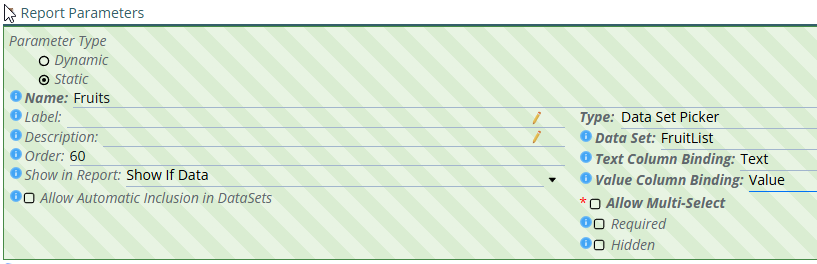
Step 3: Save the Parameter
Save the parameter. The parameter can now use the FruitList data set as its available options.
When the parameter is displayed, the user can select a fruit from the custom list instead of manually entering a value.
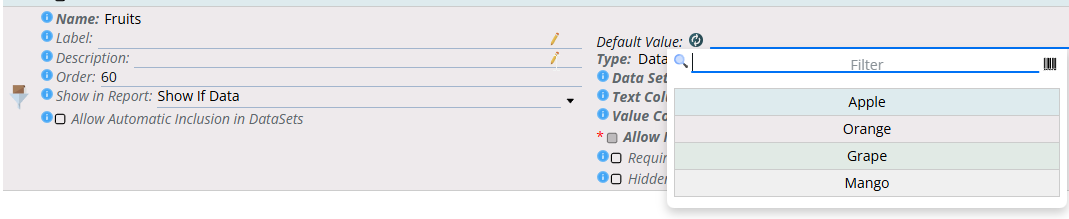
4. Can be configured to have its items from the lookup tables
A static parameter can also be configured to display a list of values from the lookup tables.
5. Can be configured to be an entity picker
A static parameter can also be configured to display a list of values from a specific table, similar to a dynamic parameter.
This allows the user to select a value from a predefined list of fields retrieved from the database instead of entering the value manually.
Dynamic Parameters
Sometimes a report should only apply filters when the user selects them.
For example:
- If the user selects Repair Center only, filter by Repair Center.
- If the user selects Account only, filter by Account.
- If both are selected, apply both filters.
- If neither is selected, return records without restrictions by Repair Center or Account.
Instead of writing every possible combination manually, dynamic parameters build the filtering portion of the query at runtime.
Unlike static parameters, dynamic parameters do not simply replace parameter values—they generate the appropriate SQL conditions and insert them into predefined placeholders.
It may feel like you can use Static Parameters to do everything that Dynamic Parameters do, but you'd have to write complex SQL and that complex SQL gets sent to the server. Dynamic Parameters adjust the SQL before it is sent to the SQL Server.
How Dynamic Parameters work
Dynamic parameters use reserved comment placeholders within the SQL statement. During report execution, these placeholders are replaced with the generated filter conditions.
1. /**where**/ - Use this placeholder when the query does not already contain a WHERE clause. (otherwise as below use the /**filter**/ clause)
Design-Time Query:
SELECT
  AccountPK,
  AccountID,
  AccountName,
  RepairCenterPK,
  RepairCenterID,
  RepairCenterName
FROM Account
/**where**/
Assume the report contains two parameters:
- AccountID
- RepairCenterID
Runtime Query:
SELECT
  AccountPK,
  AccountID,
  AccountName,
  RepairCenterPK,
  RepairCenterID,
  RepairCenterName
FROM Account
WHERE AccountID = @AccountID
AND RepairCenterID = @RepairCenterID
Notice the key word AND is place between multiple dynamic params.
If no dynamic filters are selected, the placeholder is removed and the query executes without a WHERE clause.
2. /**filter**/ - Use this placeholder when the query already contains a WHERE clause. (otherwise as above use the /**where**/ clause)
Instead of generating another WHERE, the report appends the generated filters using AND.
Design-Time Query: the way you define it
SELECT
  AccountPK,
  AccountID,
  AccountName,
  RepairCenterPK,
  RepairCenterID,
  RepairCenterName
FROM Account
WHERE Type = 'DEPT'
/**filter**/
Assume the report contains two parameters:
- AccountID
- RepairCenterID
Runtime Query: line 10 above will be removed and lines 10 and 11 below will be added by the report run time engine
SELECT
  AccountPK,
  AccountID,
  AccountName,
  RepairCenterPK,
  RepairCenterID,
  RepairCenterName
FROM Account
WHERE Type = 'DEPT'
AND AccountID = @AccountID
AND RepairCenterID = @RepairCenterID
Using Static and Dynamic Parameters in the Same DataSet SQL
A DataSet SQL can use both Static and Dynamic parameters at the same time. When doing so, it is important to structure the WHERE clause correctly so that all conditions are applied as expected.
Consider the following conditions:
- Constant Condition:
Type = 'DEPT' - Static Parameter:
AccountID - Dynamic Parameter:
RepairCenter
When combining these, follow this order in the WHERE clause:
- Constant conditions
- Static parameter conditions
/**filter**/(Dynamic parameter placeholder)
The /**filter**/ placeholder should always be the last condition in the WHERE clause. At runtime, it is replaced with the SQL generated from the selected Dynamic Parameter(s). Placing it at the end ensures the generated filter is appended correctly without affecting the existing query logic.
SELECT
  AccountPK,
  AccountID,
  AccountName,
  RepairCenterPK,
  RepairCenterID,
  RepairCenterName
FROM Account
WHERE
  Type = 'DEPT'
  AND AccountID = @AccountID
  /**filter**/
Note: /**filter**/ is replaced at runtime with the generated SQL for the Dynamic Parameter. For example, if the user selects one or more Repair Centers, the placeholder is replaced with the appropriate filtering condition before the query is executed.