

 Maintenance Connection Everywhere (MCe) · EAM/CMMS manuals
TL;DR
In general, unless you are given specific instructions, such as in one of our docs or one of our support people, you shouldn't edit .kdl files, use them as is to import.
But sometimes you do need to edit them. In these cases, follow the instructions carefully, don't rush, or use our Professional Services to change it for you.
Use a text editor type tool to edit, not a word processing tool like Word, OnlyOffice, LibreOffice etc..,
Despite the precautions, editing these can let you do some dramatic changes much easier than in the UI.
Details
See also: What's a .kdl?
Tools to use:
You can use any text editor like notepad, notepad++, Visual Studio Code. Basically, any tool that will treat it like a text file and not try to format it with color or font size or paragraphs etc..,
Don't use tools like Word, OnlyOffice, LibreOffice - they tend to put in 'funny' characters that will cause it to fail when importing it.
Keep a copy of the original, in case you have to 'try again'!
How to/not to edit::
KISS: Keep it simple, seriously.
In general, try to keep your changes as straight forward as possible, do as many changes after you import as you can, but sometimes you have to change it before import it.
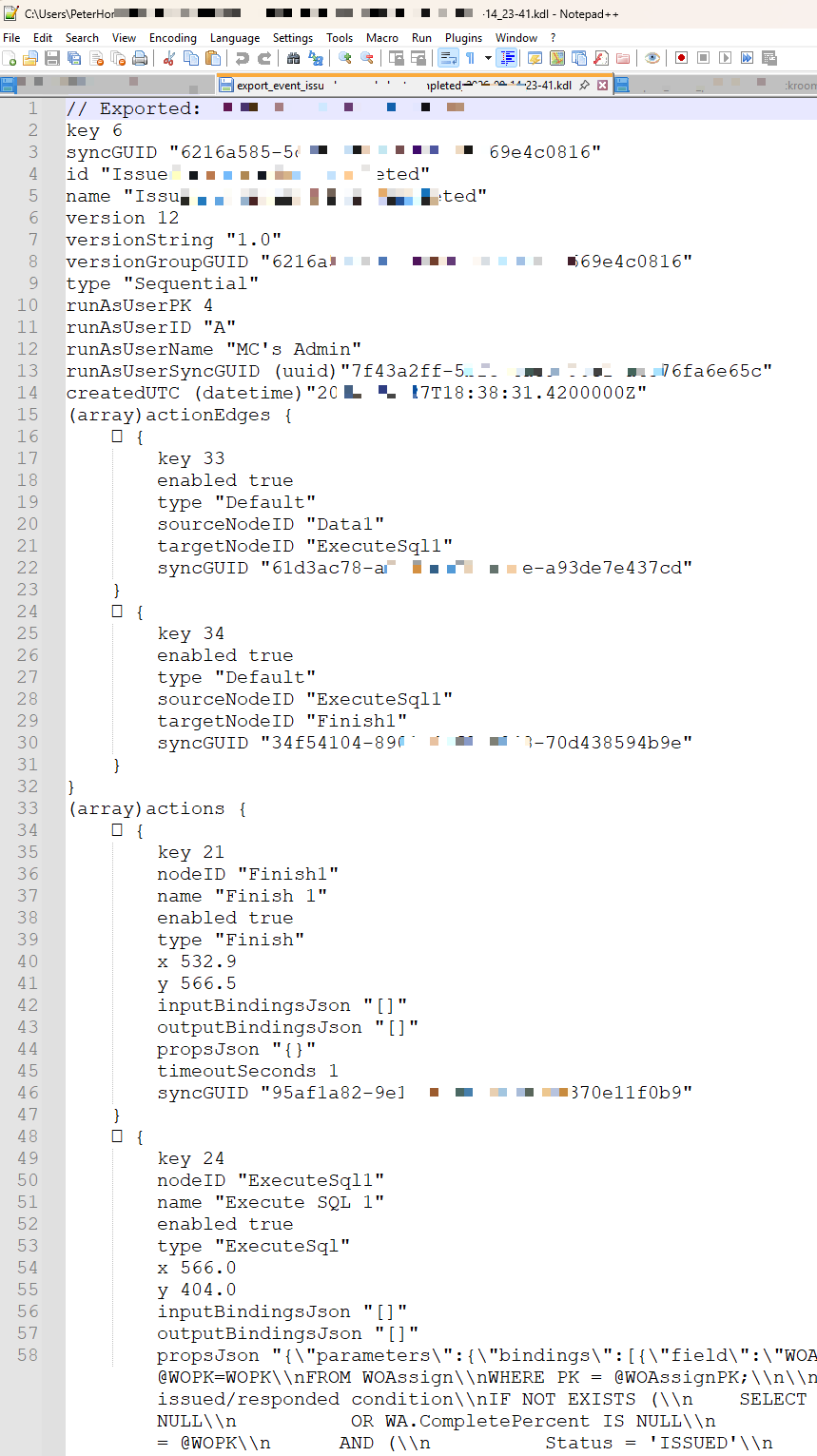
This doc uses the sample .kdl file below to discuss some ideas to help you safely edit them.
Comments:
The first line starts with //, using 2 slashes aka forward slashes means the rest of the line is 'just a comment' and making changes there are completely benign and a good idea to document your changes if you are going to use this same .kdl more than once. Note that backslashes \ are a completely different character used for other purposes.
Key value pairs:
A lot of the values in a .kdl are in what is knows as a 'key value' pair. Meaning on the left there is a 'key', and on the right there is a 'value'.
Numeric vs String: They look almost identical but they aren't.
Look at Line 2, which uses the key "key", and has a numeric value 6. key 6
If it had, instead key "6" that would mean it is a string value "6" not the numeric value 6.
In many cases the difference between the key value 6 and the string value "6" is the difference between a successful import and a failed import. Don't change these. It may be important to change a '6 to an 8 or a "6" to an "8" but never add or remove the quotes around a value. Even here it is hard to discuss it correctly, because the value of the string doesn't include the quotes around it, just the value between the quotes, the quotes are 'telling' the computer to treat it like a string of text instead of like a number.
CaSe mAttERs
In computer technical 'stuff', case of characters often matters. So the key version might be completely different than the key Version or VERSION or VeRiSoN. Try to not edit them, and if you do, consider using copy paste to avoid changing the case of anything.
In other cases there is something that tells the parser how to read the value, that is what the (uuid) and (datetime) are for. Don't edit them!
GUIDs or UUIDs - special very valuable numbers
On line 8 you can see an obfuscated GUID. GUIDs aka UUIDs What are GUIDs and UUIDs are special numbers that need to be in exactly the format you see. You might have to change one; usually you'll change the matching PK or ID instead though. If you have to change them change everything between the "" quotes.
Changing references
One of the most common changes you'll make is to export with one reference and import with another. In some cases, like UI Config, Preferences and Procedures this is so common and complicated that we provide special tooling in the import to help you do this. In others it isn't so common and not as easy to create a UI that makes it clear, in those cases you edit the .kdl.
In the event and action below, sometimes you'll want to change the 'runAsUser'. You'll see below it has a PK, an ID, a Name and a SyncGUID for the runAsUser. If you are importing into a database, the system will try various possibilities to see if it can find a match. It typically will try PK first then ID then GUID then Name to see if it can find a match.
When you see a set of 4 like that, you only need one. So if you are changing it, take the value you know you want it to be, and DELETE the other 3 rows. So, if you know the ID of the runAsUser is SallyForth, you would change line 11 to be runAsUserID "SallyForth" and delete the PK, Name and SyncGUID lines (currently lines 10, 12 and 13)
Changing complex strings, be careful with JSON values
One of the hardest to change successfully is a 'JSON' type value such as propsJSON on line 58 above, it has a lot of what are known as 'escape' characters, that is what all the \ and \\ backslashes are for. Getting even 1 wrong will cause it to fail and often fail in a very difficult to diagnose way. Be extremely careful and/or use our professional services to help. Note that passing values with backslashes in it through many chat windows, such as Teams chat, can corrupt it - because it reads the backslash as a command to itself, not as a character to be drawn. So generally, these should be passed inside a .kdl or .txt file to preserve their integrity.