

 Maintenance Connection Everywhere (MCe) · EAM/CMMS manuals
Intro
MCe Automations (including PMs and PdMs) are compatible with MC PMs
It is important to note first that if you have PMs that are working in MC, you do not need to convert them to MCe Automations to start using MCe Automations.
Accruent MC PMs and MCe Automations are designed to work beside each other, so you can have both of them running at the same time, just don't run the conceptually 'same' PM on both with the same assets.
We've been running compatible with MC for nearly 25 years and we plan to for 25 more!
More details
Database collation compatibility (On Prem issue only)
If you have MC PMs failing due to Collation compatibi0lity issues (known MC 2025 issue where they use a temp table that is using the server collation and unsuccessfully trying to compare using the database collation) you can run MCe, if/where we use temp tables, we force the collation of the temp table to match the collation of the ent database. We have a current fix we auto install for you, but there are other reasons you may want to 'fix' it so you aren't forced to use MCe if/before you want to.
PM, PdM and more
Both can do PM
MCe does PdM (Predictive, based on specs or meter values)
Both can do time based or meter based. MCe allows you to have an up or a down time that crosses over the Dec 31st boundary.
Control
MCe lets you insert scripts in several places. These scripts can access other data in the EAM/CMMS or on the internet, from devices like iOT for making decisions, it can also write to other sources including iOT, Web API, the EAM/CMMS database and more. While most companies will want to use our Professional Services for the initial writing, often tweaking values later are done by our customers themselves.
Flexibility
Similar answer to control - gives great flexibility.
Do you need 2 or more WO at any steps? MCe lets you easily.
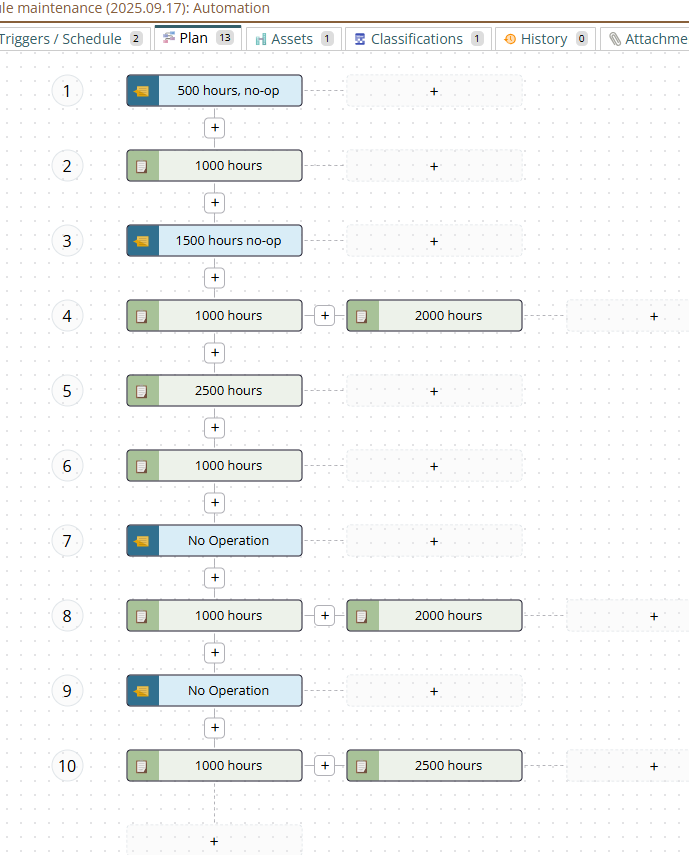
Do you have steps that need to 'do nothing'? (think 500 hour intervals with steps at 1000, 2000 and 2500) MCe let's you put in do nothing place holders.
Reliability
MCe was build by design for higher reliability.
The most significant factor for reliability (but not the only) is that MC PM generation only runs once a day, if there is a 'deadlock' (Database Technical term) when it is running it stops and waits a full day before trying again. Other reasons appear to be, if the server happens to pick 'that' time for a routine1 reboot of the computer, workers etc.., and it then 'misses' running successfully for the day. If you are running daily PMs this is clearly a problem because even 1 miss is too many, and it isn't unheard of, especially with deadlocks, it happening several days in a row, necessitating manual running - and necessitating watching it every morning to see if it ran last night.
Some people with On-Prem have reported unexplained issues with manual generations. Since this is rare it isn't that important, and most of the time (over 99.9%) using our 'why aren't my PMs running" doc set solves it. See our 'start here' document if you are having troubles with PMs not running.
Seasonality
With MCe Automations, your seasonality can go over the end of a year, so you can block OR have a season be October to March if you want, as well as 'in year' seasons, like June to September
Graphical design
MCe uses a graphical design that you can zoom in and out and pan around.
Footnotes
-
1: By default, IIS restarts (recycles application pools) every 1740 minutes, which is exactly 29 hours. This specific interval was chosen by the IIS team in version 6.0 because 29 is the smallest prime number greater than 24 (24 hours in a day), ensuring that the recycle time staggered across days rather than occurring at the same time each day.
This default behavior is designed to prevent resource leaks in web applications by automatically restarting worker processes. While the recycle happens automatically, for our on-prem customers, administrators can modify this setting in the IIS Manager under Application Pools > Recycling > Fixed Intervals, or configure it to recycle based on memory usage or request counts instead of time. ↩