

 Maintenance Connection Everywhere (MCe) · EAM/CMMS manuals
TL;DR
Automatically creates a Work Order when the action is triggered.
Assigns a predefined Procedure to the Work Order.
Reduces manual work by automating maintenance scheduling.
Ensures consistent maintenance tasks across recurring Work Orders.
More Details
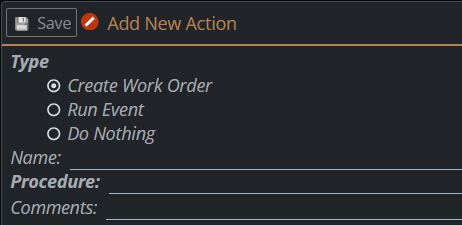
The Create Work Order action automatically creates a new Work Order when the associated event or trigger is executed. The Work Order is generated using the selected Procedure, allowing maintenance tasks to be scheduled consistently without manual intervention.
Each Create Work Order action requires a Name and a Procedure. An optional Comments field can be used to provide additional information about the purpose of the action.
Automatically Generate Work Orders
Use Create Work Order whenever maintenance should be scheduled automatically.
Instead of creating Work Orders manually, the system generates them when the configured trigger or event occurs.
This is commonly used for:
- Preventive Maintenance
- Meter-based maintenance
- Time-based maintenance
Reuse Existing Procedures
A Procedure defines the tasks that will be included in the Work Order.
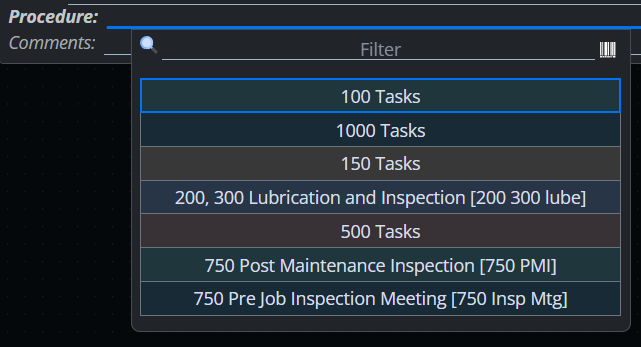
Rather than recreating the same list of tasks each time, simply select an existing procedure when configuring the action.
Examples in the image below include:
- 100 Tasks
- 500 Tasks
- Lubrication and Inspection
- Post Maintenance Inspection
Even if there is only 1 task in the procedure, for consistency, you should have a procedure that you use to create the WO.
Using procedures helps ensure consistency across all automatically generated Work Orders.
Standardize Maintenance
Create Work Order actions help standardize maintenance activities by ensuring every generated Work Order follows the same procedure.
This reduces manual data entry, minimizes errors, and ensures technicians receive the correct set of maintenance tasks every time.
Example
Consider the following maintenance schedule:
- Every 100 hours – Inspection
- Every 500 hours – Lubrication
- Every 1,000 hours – Full Preventive Maintenance
Each interval can trigger a Create Work Order action that references the appropriate procedure.
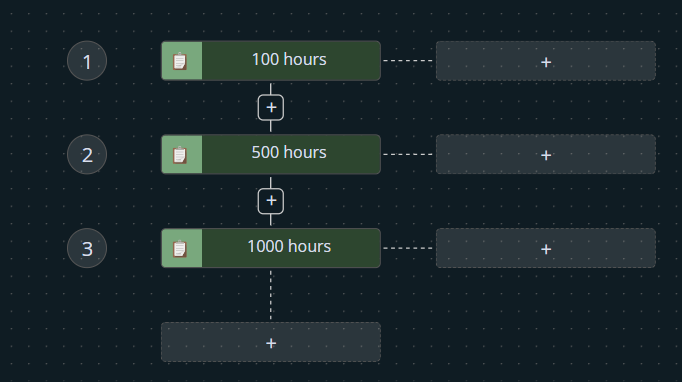
When each interval is reached, the system automatically creates a Work Order using the selected procedure.
Result
When a Create Work Order action is triggered:
- A new Work Order is created.
- The selected Procedure is assigned to and used to create the Work Order.
- Maintenance tasks are generated automatically.
- The action is recorded as part of the workflow.
This allows maintenance to be scheduled consistently while reducing manual effort and improving operational efficiency.