Maintenance Connection Everywhere (MCe) · EAM/CMMS manuals
First Steps
See also 'PMs not running index'As you go through, take screen shots as appropriate showing that the listed issue is not the problem. If you follow through each step, in more than 20 years there has not been a case that was not in the list below, when/if new ones are found ,they will be added below very quickly, if you need support, we will be asking you to show screen shots for the steps you took.
There could be multiple issues, you may have to go through the charts more than once.
This document is split into 2 sections, the top is a flowchart, the bottom is links to documents with details on each of the different types of issues.
Flowchart to check
---
config:
  theme: 'forest'
---
flowchart TD
    classDef Start fill:#FFA000,color:#FFF,stroke:#F00,stroke-width:2px;
    classDef External fill:#00921a,color:#FFF,stroke:#000,stroke-width:2px;
    classDef UserQ fill:#FFF176,color:#000,stroke:#FFEB3B,stroke-width:2px;
    classDef End fill:#7B1FA2,color:#E1BEE7,stroke:#00,stroke-width:2px;

    Start[Our PMs aren't running]:::Start                    --> SomeOfTheTime{Do they<br> work some<br> days and<br> not others?}
    Start -->     RareCase[Rare Case, SQL job<br>See SQL link]
     SomeOfTheTime -- Yes --> MCeOrMC3{MCe<br> Automations<br>or MC PMs?}
     SomeOfTheTime -- No --> SomeOrAllPMs{Some or ALL<br>PMs for<br> this database?}
     MCeOrMC3 -- MC --> X6[See<br> Intermittent<br> MC, below]:::External
     MCeOrMC3 -- MCe --> X4
    SomeOrAllPMs                           -- Some      --> MCeOrMC1{MCe<br> Automations<br>or MC PMs?}
    SomeOrAllPMs                           -- All            --> MCeORMC2{MCe<br> Automations<br>or MC PMs?}
    MCeORMC2                                -- MCe         --> SaaSorOnPrem{SaaS or<br> On Prem?}
    MCeORMC2                                -- MC           -->ClearedError[Cleared Possible<br> Error flag?]
    ClearedError                              -- Yes           -->SaaSorOnPrem
    ClearedError                              -- No            -->PressAdvanced[/Press Advanced Button/]
    PressAdvanced                          --> WorkingNow{Working Now?}
    WorkingNow                              -- No            -->SaaSorOnPrem
    WorkingNow                              -- Yes         -->Done[Done]:::End
    SaaSorOnPrem                          -- On SaaS  --> X1[Contact support, while waiting for reply, check down the 'Some' branch to make sure it isn't because of how they all are set up update the ticket as you check, link below]:::External
    SaaSorOnPrem                          -- On Prem --> X2[See 'No PMs are running, we are on prem' link below]:::External
    MCeOrMC1                                  -- MCe         -->  X4[See MCe,<br> only some<br>link below]:::External
    MCeOrMC1                                   -- MC           --> X5[See Accruent MC,<br>only some<br>link below]:::External
Links based on the end point of the chart above
- MCe, only some
- Accruent MC, only some
- No MCe PMs are running
- No PMs are running, we are on prem
- Rare case - SQL job interfering While this is at the top, it will normally be one of the last things you check because it is very rare.
Intermittent MC
Accruent PMs run only once a day. So if something happens that causes them to not run, like a (sorry tech talk coming up) 'deadlock' or a restart of the server or service worker, you have to fix it by running it manually - best to check daily if there are critical ones. In this case, we recommend MCe which runs regularly and is designed for reliability. MC's PMs tell you nothing when they fail and give you a WO when they work. MCe's Automations fail for less often, but they tell you when they fail and tell you why, and tell you when they succeed and of course do their job (which is usually to create a WO or more) when they succeed.
Cleared errors/Press Advanced button
If for any reason MC PM generation of Work orders, manual or automated, get interrupted, by error, by computer rebooting, but you shutting it down, you cancel a manual generation, MC PMs get into a broken state where by no PMs for the entire database will run and therefore no Work orders will be created.
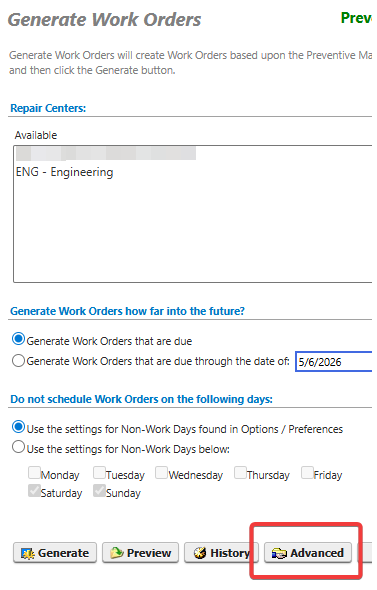
There is an 'advanced' button who's sole purpose is to clear the state to let PMs start running and creating work orders again.
Note "Let" does not mean it will immediately run scheduled PM generations 'right now', it means it will let them run again on the next regular scheduled run if everything else is good. The next scheduled for MC PMs is typically set by most customers to be 'tonight'.
If you want to catch up immediately (run missed PMs) instead of on your schedule you can 'manually' generate (same screen as the advanced button) for each of the repair centers.
Whether it was one that got stuck or many, pressing this button clears the error flag for all of them.
Assuming the cause of the problem is now solved, you won't have to press the advanced button again (until the next time you cancel or your server is rebooted during a PM generation run)
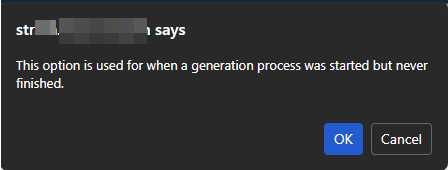
After you press the Advanced button, it will remind you what the purpose of the button was. Hit OK.