

 Maintenance Connection Everywhere (MCe) · EAM/CMMS manuals
When you have anything other than "Company / Organization" chosen you are working at a preference level that overrides preferences set at a more overall level.
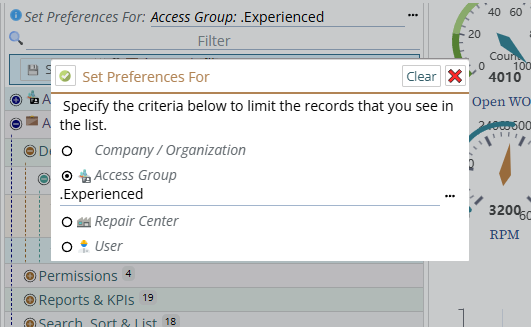
So in the case below, we have chosen that the Access Group .Experienced (#1) will override other levels.
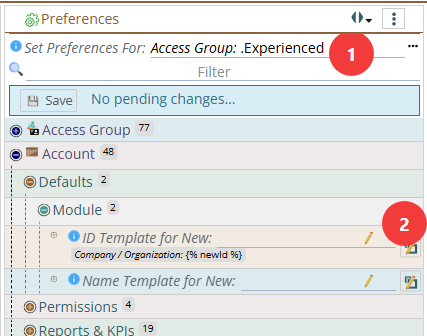
So in this case, we see that
- above the ID Template for New: was set to
{% newid %}at a previous level- it could have been Company / Organization or it could have been Repair Center. (It also could have been the out of the box default)
- If you set it to something else here, for the
.Experienced(1) Access Group, then- when the Labor creating the new Account
- the new Account will by default get the ID that is specified below
{{Name}}(The line at #2 above, resulting in the value below) - instead of the value in grey.
If you press the preference expand button (the button at #2) it will expand so you can see the current override level for this specific preference.
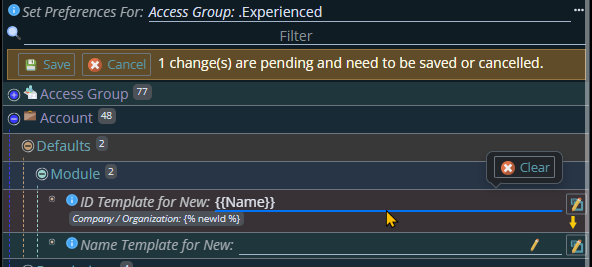
Aside: If you press the expand button again when expanded (it changes to show the small square bolder) it will collapse back to the previous view.
The default is
- Out of the box default (any you set override that)
- Company is overridden by Repair Center
- Company and Repair center are overridden by Access Group
- Company, Repair center and Access Group are overridden by Labor
This default works for almost everyone. But there are edge cases where you might want to change the order of Repair Center and Access Group and, as above, even rarer cases where you might want to put Repair Center as the last.
Normally there is no reason to change the Override order. It is very rare to have a case where it would make sense. But the expand area Override Order exists for those very rare cases. So generally you can stop reading here and just come back if you run across one of those special cases where the override order isn't working for you.
Special cases, change the override level
Company / Organization level is always the top, or 'least important' level. Any of the other three will override it.
There are very few cases where it makes sense to override Labor. In almost every case if you have a setting for a Labor it should override any other settings, so it is normally at the bottom. (There is one or two extremely edge cases where it might make sense for Repair Center to override Labor which is why you have the possibility to move it's precedence order.
You can change the order of precedence if you want by clicking on the Override Orde.
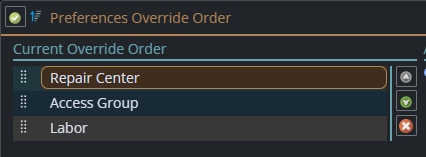
Typically you would only flip the order of Repair Center and Access Group if you can even do this.
Note: Some preferences have no 'Access Group' associated with them as they are not tied to the Labor record doing the work but rather tied to the entity like the Asset. And other prefernces have no "Repair Center"