
 Maintenance Connection Everywhere (MCe) · EAM/CMMS manuals
This doc answers the questions:
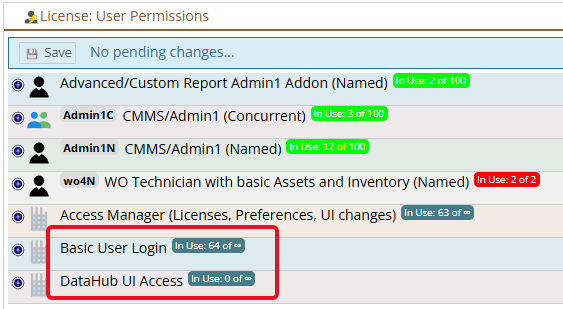
- do I have any licenses installed?
- If so how many DataHub tokens do I have, and
- who has permission in my system to build DataHub connectors and consume tokens.
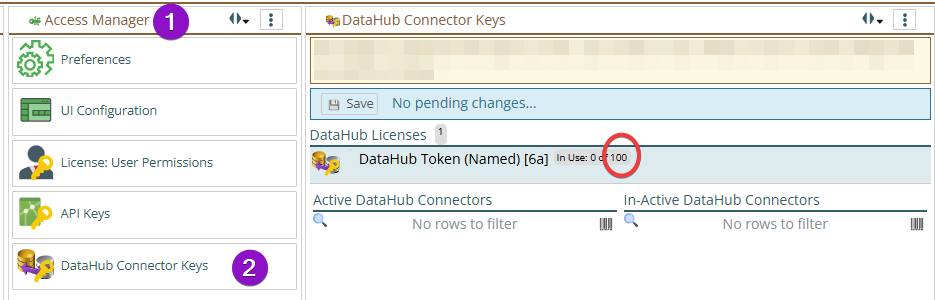
If you go to the Main menu, Configuration, Access Manager, DataHub Connector Keys you will see how many DataHub tokens you have. For many customers 100 is plenty and that is included in the basic DataHub license. If you are a heavy user you may see a number higher than 100. You can also see your active and inactive connectors on this page to see what is consuming tokens.
There is a 'user' license that everyone has, and that lets you decide who on your team is allowed to create DataHub connectors and consume license tokens.
Go to the Main menu, Configuration, Access Manager, License: User Permissions
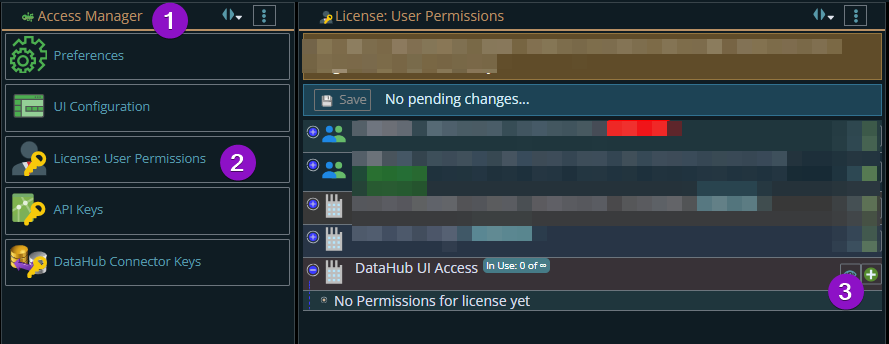
Here you can add (the green circle with the plus on the right) to give people permission to use the DataHub. By default, no one has access to this.
The icon of a large factory (to the left of "DataHub UI Access" shows this is an enterprise license, you can let as many people as you want have access to building and managing DataHub connectors. The number of people having access only affects you, the license restrictions are based on the tokens you are using, as above.
For some customers, the users that create and maintain DataHub connectors don't do anything else in the system. They do not have to have any other licenses (other than the 'Basic Sure Login'