

 Maintenance Connection Everywhere (MCe) · EAM/CMMS manuals
How to see GUID/UUID uniqueidentifier formatted
With dashes, with {}
By default, when you ask to display a uniqueidentifier?uniqueidentifier is the generic and the SQL specific way to name a GUID/UUID aka GUID?GUID is the Microsoftian name of a uniqueidentifier or UUID. Global Unique IDentifier aka UUID?UUID is the Linux world way of referring to a uniqueidentifier, aka GUID. Universally Unique IDentifier column in a table, you are shown it is a compressed way without dashes.
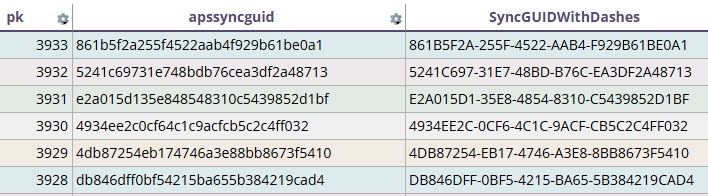
Convert the date to a string to get exactly what you want:
The trick to seeing it raw is to return it as a string instead of a 'uniqueidentifier' .
MS SQL aka TSQL solution:
SELECT
pk
,apssyncguid
,CONVERT(VARCHAR(36),apssyncguid) AS SyncGUIDWithDashes
FROM wolabor
ORDER BY pk DESC
Bonus tip, if you want it without dashes in a 'normal' SQL such as a report, that doesn't remove the -'s for you automatically use:
REPLACE(CONVERT(VARCHAR(36), apssyncguid), '-', '')In a similar way, if you have a unique identifier in a plain string format, you need to add dashes to it
POSTGRES solution:
SELECT apssyncguid::text FROM wolabor;