
 Maintenance Connection Everywhere (MCe) · EAM/CMMS manuals
If you get an "Unable to connect to server. Failed to fetch" error, there are several things that could be the issue.
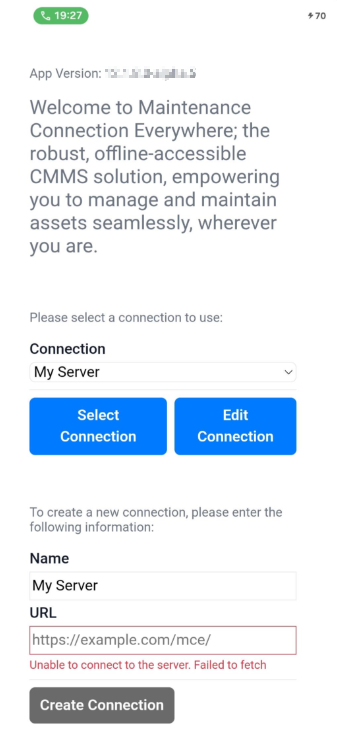
The most obvious is ... is the URL valid?
We try to fix it for you
if you had typed in 'example.com' we fill in the 'most likely' values.
So we throw https:// on the front if there is nothing 'similar' already on the front.
We tag /mce or /mce/ on the end if it seems appropriate
Truly common mistakes:
Did you use a - or space where you are supposed to use a _
Did you use an @ [email protected] when you were supposed to use a .
Did you use .com when you should have used .ca or some other 'not .com' ending (a different TLD, Top-Level Domain)?
Are you connecting through a 'captive portal'?
What is a captive portal?
A captive portal is a web-based authentication page that intercepts your initial network request and requires you to answer a simple challenge question (checkbox for example and ok button), log in, accept terms of service, or provide credentials before granting you access to the internet. It acts as a gateway for public WiFi networks in venues like airports, hotels, hospitals and coffee shops, ensuring that only 'authorized', loosely or otherwise, users can access the the internet while typically seeing some marketing info in exchange for the free WiFi.
Key functions include one or more of:
- Authentication: Verifying users via simple web page, social media login, email registration, SMS verification, or payment gateways.
- Legal Protection: Requiring users to agree to an Acceptable Use Policy (AUP) or terms of service to limit provider liability.
- Marketing: Collecting first-party customer data and displaying branded content or advertisements during the login process.
- Access Control: Blocking all non-essential traffic for unauthenticated clients, redirecting only HTTP/HTTPS requests to the portal server.
- Site access: blocking based on URL
These have been famous in airports where they give you some number of minutes free then charge you to continue access, either paying the airport authority directly or by having you sign up to some company that has access in a variety of places.
Sometimes (most times?) it will time out after a period, perhaps 30 minutes or an hour, and then you have to sign in again. Often when this happens the 'sign in' page is hidden behind other pages, possibly in the same window that you signed in earlier.
You might be trying to connect through a 'captive portal' where if you connect on their public WiFi you have to go to a browser and give permission, and that permission lasts for <x amount of time>.
Perhaps you aren't currently connected to the public, or the Timmie's or the Starbuck's etc.., internet, just to their WiFi.
Perhaps it's because you spent too long sipping your double double cappuccino mocha latte with oat milk and 2 espresso shots and you need to sign in again.
- if you are connected to a captive portal, even if you have CONNECTION to the internet, the firewall will be very different.
Unstable connectivity?
Much of MC is purposely designed to handle flakey internet or no internet, and even on a 'solid' internet - you can see with tools that lots of packets are missing (Lost packets: 0.001% when there are 1,000,000 packets a second means 10 missing per second.)
But initial setup tends to be much less forgiving. In this case, try a couple times, if it is still failing and you have internet connection for other things, this probably isn't the issue.