

 Maintenance Connection Everywhere (MCe) · EAM/CMMS manuals
Named licenses, Reasons to go with Named
- they stick with you (the person named).
- When the internet is disconnected say for 10 or more minutes, you don't have to wait for the system to acquire a license lease for you,
- or your tabs go to sleep say for 10 or more minutes, you don't have to wait for the system to acquire a license lease for you,
- in 2026 the browsers have been getting more and more aggressive about putting tabs to sleep, in August or September 2026 they seemed to suddenly get a lot more aggressive and put tabs to sleep when you aren't using them. This means you are more and more likely to come back and find the system has no license lease with concurrent. Named licenses don't care.
- You can stay offline for weeks if necessary, without worrying about reacquiring a license lease
- If you are frustrated that when you go to use a (concurrent) license, other people are consuming all the licenses, or consumed multiple licenses and you can't get a license when you want to.
Concurrent licenses, Reasons to go with Concurrent
If you can juggle times with enough people sharing it's lower cost. If you have lots of users that only need a few minutes access at a time, this can be a great way to go.
You want to use lots of devices, shared pool of devices for example where you grab and go and might get a different one after lunch than you had in the morning.
More info:
TIps:
Can I get around the go to sleep problem with concurrent?
Yes, if you think about it before you need it, set your license timeout long enough that you'll always be back, always turn your laptop on and back to MCe before it times out. Don't set it longer than you need.
You can mix named and concurrent MCe licenses on the same server. It may be worth giving your power users named licenses, and your occasional users share a sufficient number of concurrent licenses.
Remember to log out before closing a tab
If you don't, you'll still hold onto the lease, because closing the tab didn't give the software time to release the license.
Comments to help understand above
What's a license "lease"
Your company may have purchased a "30 user concurrent Admin1C/MRO license", this means 30 people at a time can share it.
As you go in to do work, we try to get you a 'lease". If you are online, and fewer than your 30 are leased out to other people, you will get a lease of one for, by default, 10 minutes - with, as discussed elsewhere in this document, a rolling timeout if you are connected to the server to be able to 'renew' the license. The renewal happens periodically, to try to keep you with at least half the time available should you lose connection to the server.
So a 'lease' means - you currently have that copy of that license, no one else can have it.
As long as you have that lease, it is yours, whether you are on line or not.
How can I lose my lease?
You lose your lease when
- you don't have an internet connection long enough to renew the lease, or
- your browser tab goes asleep for longer than the time you had remaining when it went to sleep and you don't come back to the tab before the lease runs out, or
- you log out, or
- you manually release the license, or
- you have a power failure longer than the time left on your lease
In each of these cases, the server terminates your lease, and someone else can have it. When you come back online, your client also knows it is expired, whether you are online or not, and if you have a connection to the server, we try to renew your lease.
Concurrent licenses are leased for 'a time'
usually 10 or 20 minutes. It is a rolling time, as you are using the system, every few minutes it renews it for the time you've set. When they run out,
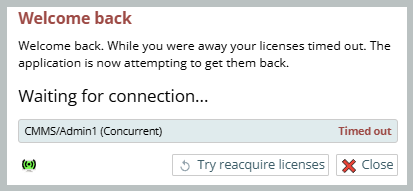
Why doesn't it INSTANTLY renew my lease when I go back and see the above message?
- Your WiFi connection may need to be restarted, and your device can take easily several seconds to do it
- Your Internet connection may need to be restarted (after a power outage, my Starlink takes about 20-40 seconds to reboot)
- Your browser may take time before reporting to us there is a connection available
- Then we have to wait for the server to respond granting the license (this is usually only a second or two, but when you are sitting staring at the screen, a second or two can be frustrating.)
You CAN set the timeout for longer
much longer, but if you do and you forget to logout when you are done, you continue to consume that license.
Named licenses are by contract restricted to 2 devices in 48 hours.
The software currently allows 3, just in case you have a legitimate reason, such as temporarily borrowing a friend's device, or you are getting a new device.
The idea of 2 devices is that a named device can be used on your tablet or cell phone and your laptop or desktop.
The idea of 48 hours is that from time to time you may get a new phone or laptop
The idea of the enforcement being 3, is so you don't have to wait 48 hours from when you stopped using one phone until you start a second.
Logout, don't close the tab
When you close a browser tab without logging out first, your concurrent license lease is not returned to the pool until the time runs out.
If you close a browser tab or the Desktop App for MC, you continue to consume a concurrent license. If you logout and you have an internet connection, your license lease is released back to the server for someone else to use.
How to extend your concurrent license lease time
Individuals, each time you need a longer lease
Shows the 'my licensees' for temporarily setting the timeout
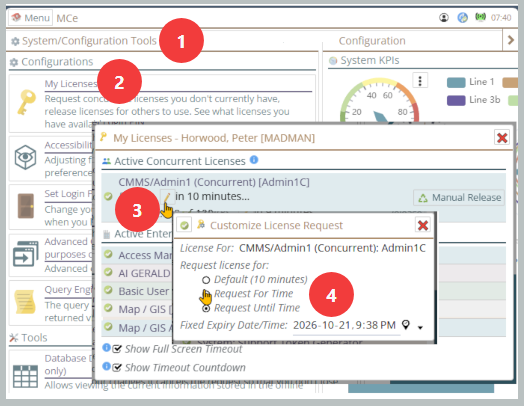
1. Configuration (from the main menu)
2. My licenses
3. The edit pencil
Admin level, change the user's defaults
The screen below shows Admin setting Default for these users to 1000 minutes, almost 17 hours, with a maximum of 12,000, just over 8 days.
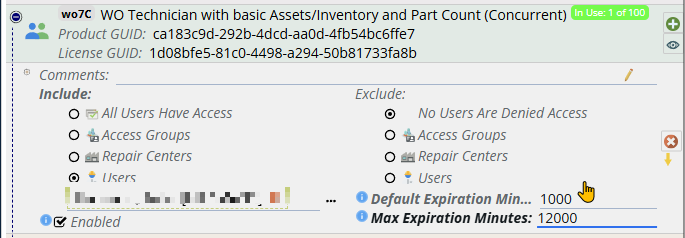
Tip: A week is 10,080 minutes, a day is 1440 minutes