

 Maintenance Connection Everywhere (MCe) · EAM/CMMS manuals
If a user says they are getting to the MC requester screen and not being offered any of the MGR options.
Aside: How can this happen? We deal with this after it happens. There may be ways in the UI but we suspect the most common ways hinge around running SQL. So SQL that is triggered and run, by time, by events that doesn't take properly into account updating all the side effects that MC needs. MC isn't reading the MGR value in the screens below from the same place that they read it when deciding what credentials you are supposed to have. Their code assumes the values are the same in both places they store them, but SQL loading doesn't necessarily abide by those rules.
The MCe API does however - a good reason to use the 'MC aware MCe API' rather than hand, or AI, written SQL to add or edit data!
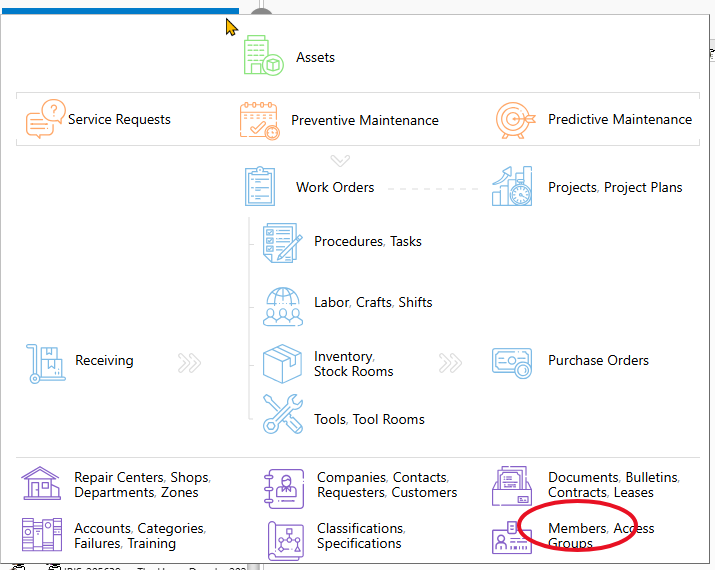
1. Go to the MC graphic menu. It will be the Green, Black, or Blue menu button depending on which version of MC you are running with.

2. Choose members
3. Find the user (you may need to change the repair center option)
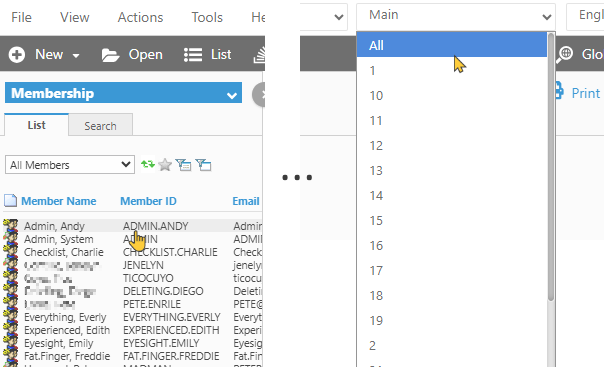
4. Choose the user
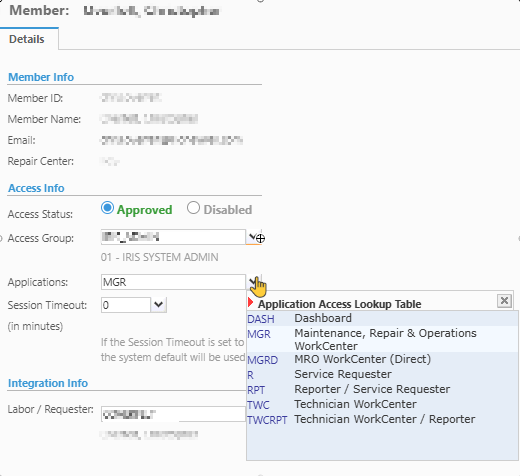
5. Choose R and hit the save button.
6. Then choose MGR and hit the save button.
7. Now ask the user to try again.
Last verified this works: 2026.07.15