

 Maintenance Connection Everywhere (MCe) · EAM/CMMS manuals
How to see raw date with milliseconds
Bypass the ease of use feature
By default, when you ask to display a date column in a table, you are shown it is a human friendly way using info in your browser for how to format it and convert it into your timezone.
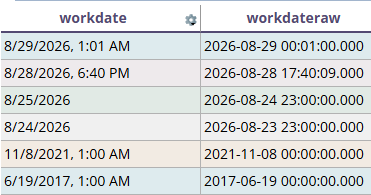
Notice also that the 3rd and 4th lines how the day in the raw is 1 day earlier than the day in the pretty format. I'm one timezone EAST of the server so 11pm server time is 'tomorrow' my time.
Convert the date to a string to get exactly what you want:
The trick to seeing it raw is to return it as a string instead of a 'date' .
MS SQL aka TSQL solution:
SELECT
workdate
,convert(varchar(23), workdate, 121) as workdateraw
FROM wolabor
ORDER BY pk DESC- Style 121:
yyyy-mm-dd hh:mi:ss.mmm(ODBC canonical with milliseconds, 24-hour clock). This is the most common standard for ISO-like formats. - Style 126:
yyyy-mm-ddThh:mi:ss.mmm(ISO 8601 without timezone, no spaces). - Style 127:
yyyy-mm-ddThh:mi:ss.mmmZ(ISO 8601 with 'Z' timezone indicator). - Style 109:
Mon dd yyyy hh:mi:ss:mmmAM(US format with AM/PM). - Style 113:
dd Mon yyyy hh:mi:ss:mmm(European format with 24-hour clock).
POSTGRES solution:
SELECT
TO_CHAR(workdate, 'YYYY-MM-DD HH24:MI:SS.MS') as workdateraw
workdate
FROM labor
ORDER BY pk DESC
Key format specifiers include:
YYYY: 4-digit yearMM: Month (01-12)DD: Day of monthHH24: Hour (0-23)MI: MinuteSS: SecondMS: Millisecond (000-999)US: Microsecond (000000-999999)