Maintenance Connection Everywhere (MCe) · EAM/CMMS manuals
MCe User Login 1st time
How to get connected
TL;DR
In MC
- there are user accounts for logging in, this contains your passwords and whatever you choose as your user name.
- Your administrator may have done this step for you.
- There are labor records/users which are associated with the work. These may be limited e.g. service request users all the way to full powered admin users.
- The login accounts and the labor records need to be connected for the login accounts by an administrator to have any real value.
So it is necessary to :
- Create the login account, if you don't have one, if your administrator didn't set it up for you
- Wait for an administrator to approve you.
Details
You will have been given a signup URL, it will typically follow the format: https://<yourdomain>/mce/#/signup,
Step1: Select Sign Up button from the main screen of MCe application.
 If the URL you were given doesn't go directly to the next step.
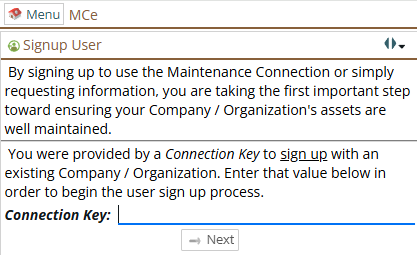
Step2: From Signup User screen, provide Connection Key.
This is the key used to access your desired database. If you don’t have any then contact administrator to have connection key. Your company may have more than one production, and may have test/training databases, or you may only have one database. If you have more than one, they may in addition be at different signup URLs.
After entering it, press the Next button.
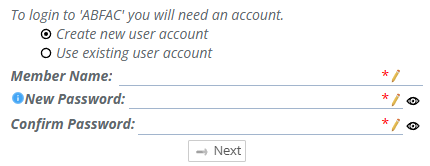
Step3: Create new user or select existing user.
Then provide member name and provide password. If your user is already created and you need to signup for different db then select existing user.
Step4: Provide additional details, in below screen and press Next button.
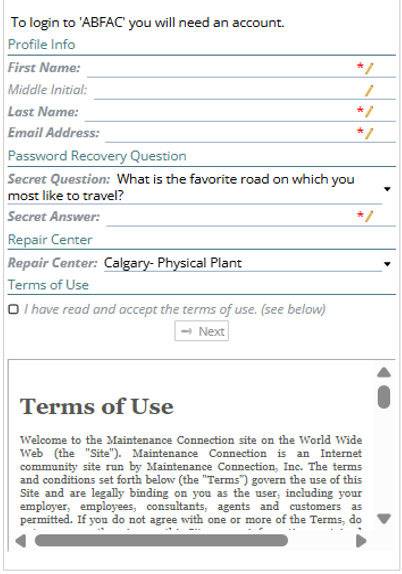
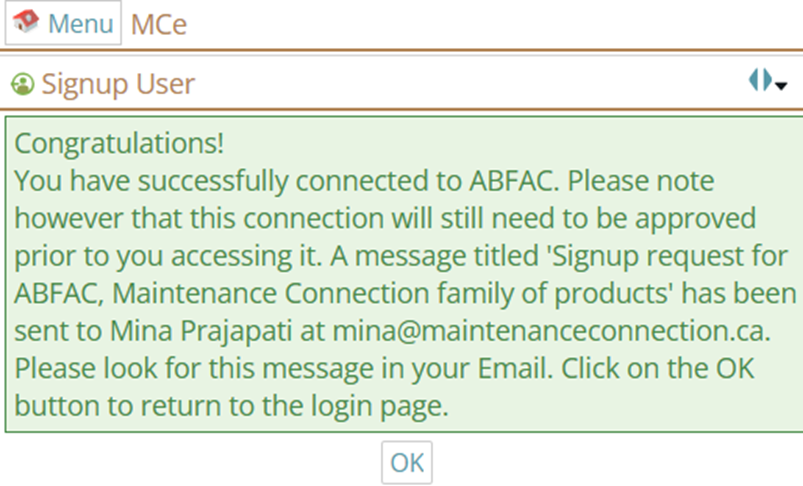
Step6: Now you will get the message of successfully signed up.
Press OK button.